-
Please click on this link to access the OLLI at Cal State East Bay website at https://www.campusce.net/csueastbay/account/signin.aspx (opens in a new window).
-
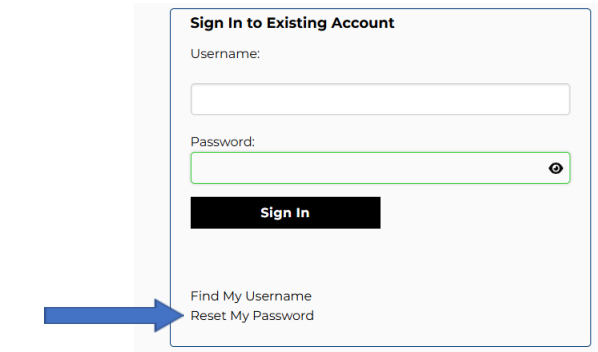
Go to the Sign in to Existing Account box. Leave Username and Password blank. Simply click Reset my Password.
-
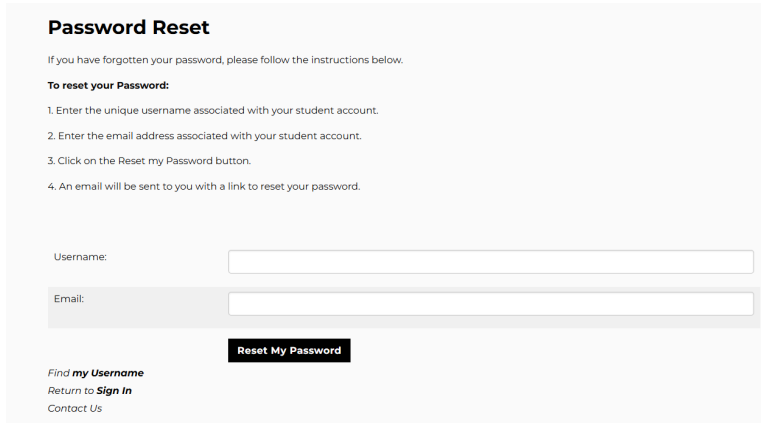
After clicking Reset My Password, you should see the Password Reset page. Please follow the instructions on this page and enter the Username and Email provided to you.
-
Once you click on the Reset My Password button, you should see: “Email has been sent to the email address.” in green. Go to your email and click on the link provided. If the link doesn’t work, copy and paste the link into your browser.
-
Follow the instructions outlined on the screen to reset your password. Your password must be at least 8 characters long and is case-sensitive. Then click Reset My Password.
-
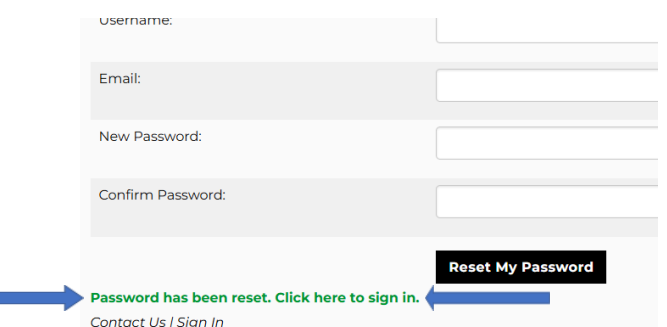
You should see “Password has been reset. Click here to sign in” in green below if you have successfully reset your password. Click on the green words, Click here to sign in.
-
Input your user name and password within the Sign Into Existing Account box. By doing so, you’ll validate your username and password and will successfully sign into the website.
-
Congratulations! You’ve successfully signed in to your account. You’ll use your username and password each time you sign into your account. Keep your username and password handy and secure, so you always know how to access the OLLI registration system.
-
While logged into your account, review the information in your profile by clicking on the Account button at the top of the page.

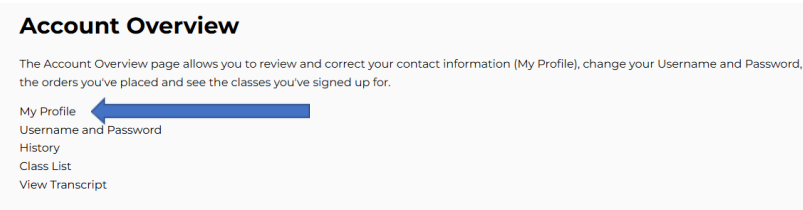
11. This will take you to the Account Overview page. Click on the My Profile link to review/update your personal information.
12. Edit your profile as needed; it is important your information is accurate. When you are finished, click SAVE CHANGES.
Thank you for resetting your password and updating your OLLI member profile!
 CAL STATE EAST BAY OLLI