See below for important information about Community and Continuing Education (CE) courses and policies.
LOCATIONS AND PARKING
Check the location of a course carefully before you register. This information will also be emailed to you. Check your Spam folder if you don't see an order status email in your inbox. Review the schedule and location of classes you have registered for on your Account page at any time.
Aberdeen Campus
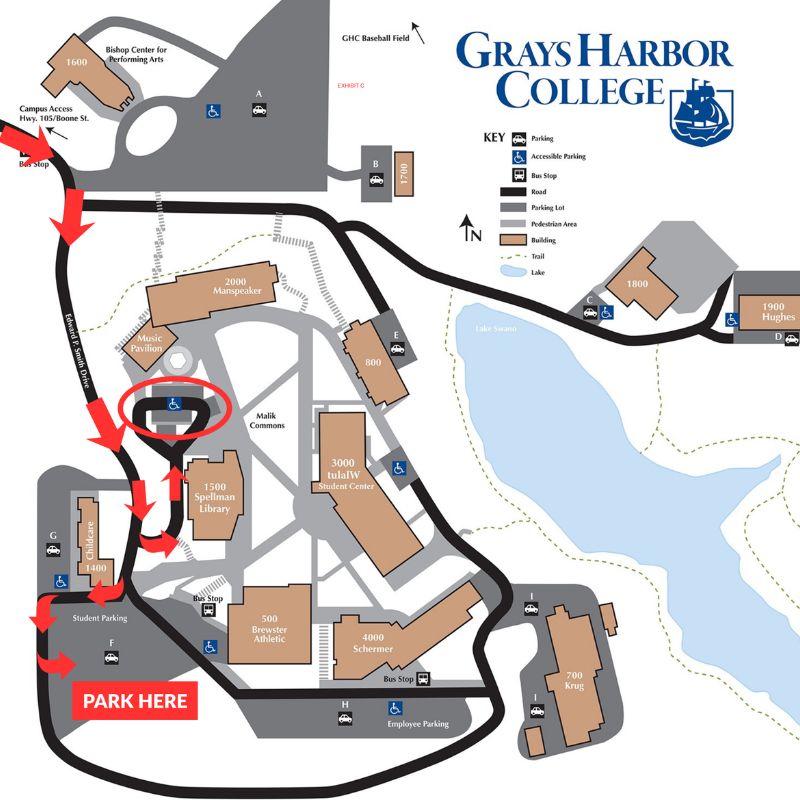 CE courses at the Aberdeen campus are primarily held in the 800 Building in Room 802, although some courses require a computer lab or kitchen and will be held elsewhere on campus. Park in Student Parking in Lot F or in the Accessible Lot at the center of campus with a disabled placard or license plate. Our campus is on a hill, but those two lots offer a level walk to most buildings. The campus map shows driving directions to both lots.
Ilwaco Campus
The parking lot for the Columbia Education Center faces the Port of Ilwaco. Enter from Advent Avenue SE, which runs between Howerton Way and Lake Street. The door to the building also faces the Port of Ilwaco. Enter from either side of the glass wind partition.
Raymond Campus
Enter the parking lot for the Riverview Education Center from Lincoln Street. Park on the east side of the building. If you enter through the side door, you'll be on the first floor of the building. If you enter through the main door facing Washington Avenue, you'll have the option to go up to the second floor or down to the first. The main office and student lounge are located on the second floor, along with several classrooms and meeting rooms.
Off-Campus Locations
Classes may be held in other locations around Grays Harbor and Pacific Counties. Please check the location of a class carefully before you register.
Online Courses
Online classes are held via Zoom. (How to Join a Zoom Meeting). Once you have registered and paid for an online class, the link will be available in your Class List on your Account page. This link will also be emailed to you within a week before the start of class. Check your Spam folder if you don't see an email from us in your inbox.
Guidelines for Online Classes
- Do not share class meeting links.
- Join the class 10-15 minutes before the beginning of class to test your audio and video settings.
- Sign into Zoom with your full name. Insrtuctors will only admit students whose names they recognize from their class roster.
- Mute your microphone when you're not speaking.
- Let others in your household know that you're in an online video class, so they know that if they walk into the room, they will be on camera.
- Don't do anything in an online class that you wouldn't do in an in-person class.
- If the instructor is speaking and you don't want to interrupt, use the chat window! This is a great way to get your question down (so you won't forget it) without interrupting the class.
REGISTRATION
Register online or by phone at (360) 538-2539. We accept Visa, Mastercard, Discover, and American Express. You must create an account to register online.
You are able to register someone else or a group of people for courses in a single transaction. To do this, follow the steps below.
- Add all of the courses to your cart. Your cart will show just one registration per course.
- When you're ready to start the registration process for yourself, yourself and others, or just someone else (for example, your child), click the cart icon, review the courses in your cart, and click Check Out.
- On the next screen, you'll start the Registration process. If you will be registering only yourself, choose Myself. If you will be registering yourself and others -- or just others -- choose Other Participant(s).
- The next screen is where you'll update your own contact information, regardless of whether you're registering yourself or others.
- If you register just yourself, you'll immediately begin the payment process on the "Payment Method" screen. If you will be registering others, add all of the participants to register on the "Participant(s) to Register" page.
- Next, update other participants' contact info as needed.
- Next, select individual courses and the participants you'd like to register for each course. Your total will update with each registration added. Preview your updated cart on the next screen.
- Finally, begin the checkout process for you and everyone else on the "Payment Method" screen.
If you have trouble with anything, please don't hesitate to reach out!
To review your schedule and class details at any time, visit your Account.
CANCELLATIONS AND REFUNDS
We may cancel a course if enrollment is low, in the event of an emergency, or if the college closes due to severe weather. We'll make a decision on low-enrollment cancellations at least two days before the beginning of a course. If we cancel a course, we will notify you by email and phone before the start date. You will receive a full refund using your original method of payment. Refunds typically take 7–10 business days to process.
If we need to cancel an individual class session within a multi-week course due to weather or other unforeseen circumstances, we will do our best to support your learning to complete the course. However, we can't guarantee make-up sessions or provide refunds for missed class time.
To cancel your registration or withdraw from a course, contact Community and Continuing Education at (360) 538-2539 or ce@ghc.edu at least two business days before the course begins. We will issue a full refund minus a $10 processing fee. We'll waive the processing fee if you transfer into another Community and Continuing Education class.
We don't provide refunds for cancellations made fewer than two business days before the class starts or after the class has begun. We may consider exceptions on a case-by-case basis—please contact us to discuss your situation.
FEES AND MATERIALS
Fees for courses vary based on course format and length and the cost of included supplies and materials. Fees are due and payable at the time of registration. Some courses require you to purchase your own supplies and materials prior to the start of class. You will be able to keep those supplies and use them again; for example, watercolor paints, brushes, and a palette or a calligraphy pen, nibs, and paper. Check your course information for a supply list and purchase early to ensure that you are prepared for your first class session.
ACCESSIBILITY
Our campuses and classrooms are accessible to people with disabilities. Please let us know when you register if you have any special needs so that we can help you participate and be successful.
Questions?
Reach out! Email ce@ghc.edu or call (360) 538-2539.